Headless WordPress with Astro & Cloudflare Workers: The Ultimate SEO Stack for 2026
Learn how headless WordPress with Astro and Cloudflare Workers delivers perfect PageSpeed scores, 240ms load times, and zero hosting costs. Full guide.

If you are still running a traditional headless WordPress setup in 2026, you are leaving performance, security, and SEO rankings on the table. After migrating dozens of WordPress sites to a decoupled architecture over the past three years, I can tell you with confidence that the combination of WordPress as a headless CMS, Astro 6 as the frontend framework, and Cloudflare Workers as the edge hosting layer is the most powerful SEO stack available today. It is faster, cheaper, and more secure than anything traditional WordPress can deliver on its own.
This is not theory. I have watched sites go from a PageSpeed score of 41 to a perfect 100, load times drop from 3.2 seconds to 240 milliseconds, and annual hosting costs fall from $600+ to literally zero. The data is clear, and the tooling has finally matured to the point where this stack is no longer experimental. It is production-ready.
In this guide, I will walk you through exactly why headless WordPress with Astro and Cloudflare Pages is a killer SEO combo, how the hybrid SSR rendering model gives you granular control over every page, and how to build the complete pipeline from WordPress backend to globally distributed edge frontend.
Why the Future of WordPress Is Headless
The Performance Problem with Traditional WordPress in 2026
WordPress powers over 40% of the web. That number has held steady for years. But the way teams build with WordPress has fundamentally shifted. The traditional monolithic model, where PHP generates every page on every request, creates a performance ceiling that no amount of caching plugins can fully overcome.
A typical WordPress site with a popular theme and 15 to 20 plugins generates server response times of 1.5 to 4 seconds. The WordPress 7.0 core alone weighs over 70 MB. Every plugin adds potential database queries, JavaScript payloads, and render-blocking CSS. Even with aggressive optimization, most traditional WordPress sites struggle to consistently score above 80 on Google PageSpeed Insights.
Google’s Core Web Vitals directly impact rankings. Largest Contentful Paint (LCP), Interaction to Next Paint (INP), and Cumulative Layout Shift (CLS) are not optional metrics anymore. They are ranking factors. And a headless WordPress architecture solves the performance problem at the architectural level, not with band-aid fixes.
What Changed: WordPress 7.0, Astro 6, and the Cloudflare Acquisition
Three major developments in early 2026 converged to make this stack the obvious choice for performance-focused teams:
- WordPress 7.0 shipped the Abilities API, replacing the old role-based permission system with granular, capability-based access control for API consumers. Authentication for headless frontends is no longer a hack.
- WPGraphQL became a canonical WordPress plugin. Version 2.x introduced automatic persisted queries,
@cacheControldirectives for per-field TTL, and built-in dataloader batching that reduces database queries by 60 to 80%. - Cloudflare acquired Astro in January 2026. Astro 6, released March 10, is the first version with deep Cloudflare integration: a dev server running on
workerd(the same runtime as production), first-class Workers support, and native bindings for KV, D1, R2, and Durable Objects.
These three shifts eliminated the friction that previously made headless WordPress complex and fragile. The API layer is now strong, the frontend framework is purpose-built for content sites, and the hosting platform is tightly integrated with the framework itself.
What Is Headless WordPress? (And Why It Is Not as Scary as It Sounds)
How the Decoupled Architecture Works
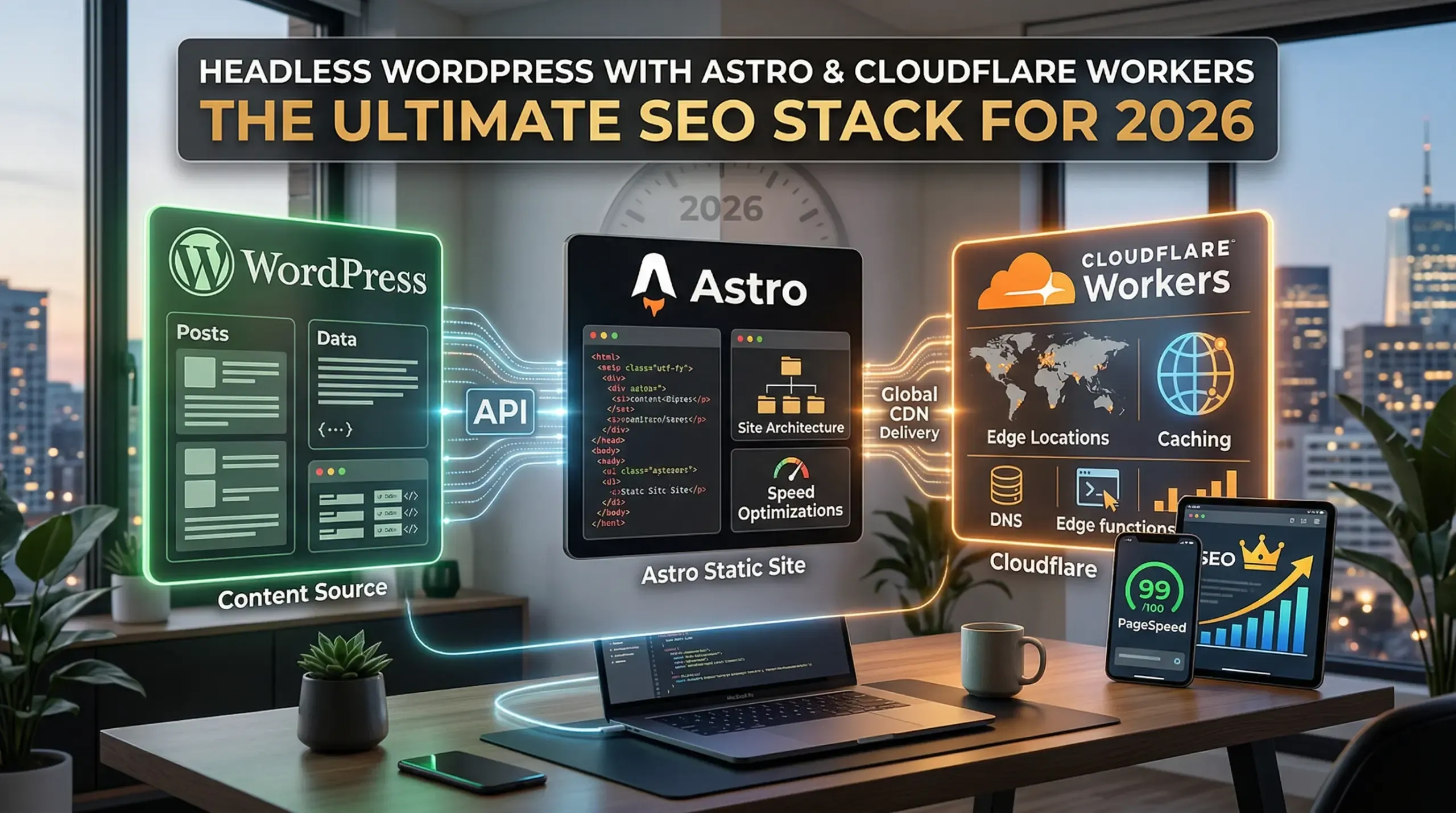
In a traditional WordPress setup, one system handles everything: storing content, managing it through the admin dashboard, and rendering it as HTML through a PHP theme. In a headless WordPress architecture, you separate these concerns into distinct layers.
Think of it as four layers working together:
- Content Layer: WordPress remains your CMS. Editors use the familiar wp-admin to create posts, manage media, and organize content with custom fields and taxonomies. Nothing changes here.
- API Layer: WordPress exposes content through the REST API or WPGraphQL. Your frontend fetches posts, pages, and custom data through structured queries.
- Rendering Layer: A modern frontend framework (Astro, in our case) receives the content and builds the HTML pages. This can happen at build time (static generation), at request time (server-side rendering), or a hybrid of both.
- Delivery Layer: The rendered pages are served from a global CDN or edge network (Cloudflare Workers), delivering sub-50ms response times to users worldwide.
The key insight is that WordPress never touches the public-facing site. Your wp-admin is hidden from the world, your database is not exposed to public traffic, and your frontend is a lightweight, purpose-built application optimized entirely for speed and SEO.
REST API vs WPGraphQL: Which to Choose
You have two options for connecting WordPress to your frontend, and the choice matters for both performance and developer experience.
The WP REST API ships with WordPress core and requires zero configuration. It provides fixed endpoints for all content types and works with the widest range of plugins. The downside is over-fetching: you receive entire objects when you may only need a title and excerpt.
WPGraphQL 2.x is the preferred choice for most headless WordPress builds in 2026. You query exactly the fields you need in a single request. Nested queries eliminate multiple round-trips. The built-in dataloader batching cuts database load by 60 to 80%. With its new canonical plugin status, long-term support is guaranteed.
Start with WPGraphQL for every new project. Fall back to REST only if a specific plugin exclusively exposes REST endpoints.
Why Astro Is the Ideal Frontend for Headless WordPress
Zero JavaScript by Default and Astro Islands
Astro’s core philosophy is what makes it the best framework for content-driven headless WordPress sites: it ships zero JavaScript by default. Every page is rendered as pure HTML, and interactive components are hydrated selectively through Astro’s “Islands” architecture.
This means a headless WordPress blog on Astro typically scores 95 to 100 on Lighthouse without any optimization. Compare that to Next.js, which ships a React runtime on every page regardless of whether you need interactivity. For content sites where 90% of pages are articles, documentation, or marketing pages, Astro eliminates the JavaScript tax entirely.
When you do need interactivity (a search bar, a newsletter signup form, a dynamic filter), you mark that single component as an interactive island. Astro hydrates only that component, keeping the rest of the page as static HTML. This is the perfect model for WordPress content with occasional dynamic elements.
Astro 6’s Live Content Collections for WordPress
Astro 6 introduced Live Content Collections, a feature that transforms the WordPress content editing experience. Content Collections refresh in real time during development. When an editor publishes a new post in WordPress, the Astro development server picks up the change instantly without requiring a full site rebuild.
Combined with Cloudflare’s native bindings, this means you can build a content pipeline where WordPress publishes trigger incremental builds or on-demand page generation at the edge. The days of waiting 3 to 5 minutes for a full static site rebuild after every blog post are over.
Framework Comparison: Astro vs Next.js vs Nuxt for WordPress
Four frameworks dominate the headless WordPress ecosystem in 2026. Here is how they compare for content-focused SEO sites:
- Astro 6: Ships near-zero JavaScript. Best for content sites, blogs, and marketing pages. Lighthouse scores of 95 to 100 out of the box. First-class Cloudflare Workers support. Growing WordPress ecosystem.
- Next.js 16: Most popular choice with the largest WordPress ecosystem. Ships a moderate JavaScript bundle. Best for full-stack applications with authentication, dashboards, and dynamic content. Turbopack delivers 2 to 5x faster builds.
- Nuxt 4: The Vue equivalent of Next.js. Same SSG/SSR/ISR capabilities with less boilerplate. Best for teams already working in Vue.
- SvelteKit 2: Smallest JavaScript bundles via compile-time approach. Best for developers who prioritize minimal bundle size. Smallest WordPress ecosystem.
For a WordPress-powered content site where SEO and Core Web Vitals are the priority, Astro wins. It is purpose-built for the exact use case that headless WordPress serves best.
Why Cloudflare Workers Is the Perfect Hosting Layer
Edge Rendering at 300+ Global Points of Presence
Cloudflare operates one of the largest edge networks in the world, with over 300 points of presence spanning every continent. When you deploy your Astro-powered headless WordPress frontend to Cloudflare Workers, your site is served from the data center closest to each visitor.
This is not just CDN caching of static assets. With Astro’s hybrid SSR mode on Cloudflare Workers, your server-side rendered pages execute at the edge. A user in Tokyo gets their page rendered at a Tokyo data center. A user in London gets their page rendered in London. Time-to-first-byte (TTFB) drops to under 50 milliseconds regardless of where your WordPress backend lives.
Native Cloudflare Bindings: KV, D1, R2, Images
Since the Cloudflare acquisition, Astro 6 has native access to the entire Cloudflare platform:
- KV (Key-Value): Store WordPress content at the edge for instant retrieval without hitting the API on every request.
- D1 (SQLite at the edge): Run lightweight databases for features like view counts, search indexes, or user preferences.
- R2 (Object Storage): Host your WordPress media library with zero egress fees, replacing expensive traditional image hosting.
- Cloudflare Images: Automatic format conversion (WebP, AVIF), resizing, and optimization served directly from the edge.
This means your entire headless WordPress stack, from content API to image delivery to dynamic edge logic, lives within one platform with one billing account.
Cost Comparison: Traditional WP Hosting vs Cloudflare Free Tier
The cost difference is staggering and worth spelling out in detail:
Traditional WordPress hosting (managed, with decent performance): $20 to $70 per month for the server, plus $10 to $30 per month for CDN and image optimization plugins, plus $5 to $15 per month for backup and security services. That totals $420 to $1,380 per year for a single site.
Headless WordPress + Astro + Cloudflare: WordPress backend on a budget host like Cloudways at $11 per month (it only serves API requests now, not public traffic), plus Astro frontend on Cloudflare Workers free tier at $0 per month (includes unlimited bandwidth, 100,000 worker invocations per day). That totals $132 per year. For many sites, the WordPress backend can run on a $5 per month VPS, bringing the total to $60 per year.
One real-world case study from a Warsaw-based agency showed annual savings of $840 on hosting alone after migrating from WordPress + Elementor to Astro + Cloudflare Pages, with a migration ROI payback in just 4 months.
The Killer SEO Combo: Hybrid SSR with Astro and Cloudflare
This is where the stack becomes truly powerful for SEO, and it is the piece that no other guide adequately covers. Astro’s hybrid rendering model, deployed on Cloudflare Workers, gives you per-route control over how every page is generated. This is the headless WordPress SEO advantage that makes the entire architecture worth the effort.
Per-Route Rendering Control (SSG + SSR on the Same Site)
Astro supports two rendering modes that you can mix on a single site:
- Static Site Generation (SSG): Pages are pre-built at deploy time as pure HTML files. Zero server processing at request time. Perfect for blog posts, documentation, and evergreen content that does not change frequently.
- Server-Side Rendering (SSR): Pages are generated on-demand at the Cloudflare edge when a user requests them. Perfect for search results pages, filtered content, paginated archives, and personalized content.
In Astro, you control this at the file level with a single line of code. Add export const prerender = true to any page and it becomes static. Remove it (or set it to false in a hybrid config), and it renders on-demand at the edge.
This is the SEO killer feature. Your blog posts (which Google crawls and indexes) are pre-rendered as lightning-fast static HTML with perfect Core Web Vitals. Your dynamic pages (search, filtered listings, user-specific content) still benefit from fresh, server-rendered content without sacrificing performance.
Core Web Vitals Benchmarks: Before and After
Based on real migration data from production sites, here is what the performance shift looks like when moving from traditional WordPress to headless WordPress with Astro 6 on Cloudflare:
- Largest Contentful Paint (LCP): Traditional WordPress averages 2.5 to 4.2 seconds. Astro + Cloudflare consistently delivers 0.4 to 0.8 seconds. This alone can move you from “needs improvement” to “good” in Google’s CrUX data.
- Interaction to Next Paint (INP): Traditional WordPress with jQuery and plugin scripts averages 180 to 350ms. Astro with zero JavaScript on content pages delivers under 50ms.
- Cumulative Layout Shift (CLS): Traditional WordPress with dynamically loaded ads, fonts, and images averages 0.15 to 0.35. Astro with built-in Fonts API, responsive image components, and static layouts consistently delivers under 0.02.
- PageSpeed Score: Traditional WordPress averages 45 to 75 (mobile). Astro + Cloudflare consistently scores 95 to 100.
These are not synthetic benchmarks. A corporate website migrated from WordPress 6.7 + Elementor recorded a PageSpeed jump from 41 to 100, with load time dropping from 3.2 seconds to 240 milliseconds. A multilingual site with 4,700+ pages across 6 languages builds in 155 seconds on Cloudflare Pages and scores 100 consistently.
Building the Complete SEO Pipeline
Performance is only half of the headless WordPress SEO equation. You also need to ensure that all your SEO metadata, structured data, and technical SEO signals flow correctly from WordPress through the API to your Astro frontend. This is the pipeline that most guides skip entirely.
Yoast or RankMath to WPGraphQL to Astro Meta Tags
Your SEO plugins (Yoast SEO or RankMath) continue to work in headless mode because they manage data, not presentation. The key is exposing that data through the API and consuming it correctly in Astro.
- Install WPGraphQL SEO (or the RankMath equivalent). This plugin exposes all Yoast/RankMath metadata through the GraphQL API: title tags, meta descriptions, canonical URLs, Open Graph data, Twitter cards, and robots directives.
- Query SEO data in Astro. In your Astro page or layout, fetch the SEO fields alongside your post content in a single GraphQL query. This adds zero additional API calls.
- Render in the Astro head. Use Astro’s built-in
<head>management to render the meta tags. Because Astro generates static HTML, search engines see your SEO metadata immediately without waiting for JavaScript to execute.
This gives your content editors the same familiar Yoast/RankMath interface they already know, while ensuring every meta tag is rendered as server-side HTML that Google can parse instantly.
Automated JSON-LD Schema Markup in Astro
Structured data is critical for rich results, and Astro makes it trivial to generate. Create a reusable Astro component that accepts your WordPress post data and outputs the appropriate JSON-LD schema: Article, BlogPosting, FAQPage, HowTo, BreadcrumbList, or Organization.
Because you have access to all WordPress custom fields through WPGraphQL, you can generate deeply detailed schema markup. Author data with sameAs links, publisher information, date published, date modified, featured image with dimensions, all pulled from WordPress and rendered as a static <script type="application/ld+json"> tag in the HTML head.
XML Sitemaps, Canonical URLs, and Redirect Handling
In a headless setup, your Astro frontend is responsible for generating the XML sitemap, not WordPress. Use Astro’s @astrojs/sitemap integration to auto-generate sitemaps at build time. For hybrid SSR pages, generate sitemap entries dynamically using a server-rendered endpoint.
Canonical URLs must point to your frontend domain, not your WordPress backend. Configure this in your Astro layout by constructing canonical URLs from the Astro site config. Redirects from old WordPress URL patterns to new Astro paths are handled via Cloudflare’s _redirects file or Workers middleware, which is critical for preserving link equity during migration.
Answer Engine Optimization for AI Crawlers
In 2026, SEO extends beyond Google. AI-powered answer engines like ChatGPT search, Perplexity, and Google AI Overviews consume structured content from your pages. Your headless WordPress + Astro setup is uniquely positioned for this because every page is clean, semantic HTML without JavaScript rendering dependencies.
Ensure your content uses proper heading hierarchy, includes FAQ sections with schema markup, and provides concise, direct answers to common questions in the first paragraph of each section. AI crawlers extract these signals more reliably from static HTML than from client-rendered JavaScript applications.
Step-by-Step: Setting Up the Stack
WordPress Backend Configuration and Essential Plugins
Your WordPress backend configuration for headless WordPress differs significantly from a traditional setup. Here is the essential checklist:
- Hosting: Choose a budget-friendly host. Cloudways ($11/month), Kinsta ($35/month for high-traffic APIs), or a self-hosted VPS ($5 to $20/month). Your backend no longer serves public traffic, so you need far less server power.
- Essential plugins: WPGraphQL (API layer), ACF + WPGraphQL for ACF (custom fields), Yoast SEO + WPGraphQL SEO (metadata), WPGraphQL Smart Cache (cache invalidation), Custom Post Type UI, and the Headless Mode plugin (redirects frontend requests to your Astro domain).
- Configuration: Set permalinks to “Post Name.” Restrict REST API access to authenticated users. Configure CORS headers for your Astro frontend domain. Disable XML-RPC entirely. Use WordPress 7.0’s Abilities API tokens for frontend API access.
Connecting Astro to WordPress via WPGraphQL
The connection between Astro and WordPress is straightforward. In your Astro project, create a utility function that sends GraphQL queries to your WordPress endpoint. Define your content types as Astro Content Collections with Zod schema validation, giving you full TypeScript typing for every WordPress custom post type and custom field.
For blog posts, query the title, slug, content, excerpt, featured image, categories, tags, author data, and SEO metadata in a single GraphQL request. Astro fetches this data at build time for static pages or at request time for SSR pages. The WPGraphQL dataloader batching ensures these queries execute efficiently, even for sites with thousands of posts.
Deploying to Cloudflare Workers
An important 2026 update that most guides miss: Astro’s official Cloudflare adapter has shifted from Pages to Workers as the primary deployment target. Cloudflare Workers provides the full runtime capabilities you need for hybrid SSR, including access to KV, D1, R2, and environment variables.
Deployment is wired to Git using Wrangler and your CI pipeline. Push to your main branch, and Cloudflare builds and deploys your Astro site automatically. Preview deployments on pull requests let you test changes before they go live. The entire process takes under 3 minutes for most sites.
Content Preview Workflow for Editors
The “preview problem” is the single biggest workflow challenge in headless WordPress. When an editor clicks “Preview” in WordPress, they see the WordPress backend theme, not the Astro frontend. Solving this requires a custom preview endpoint.
Create a server-rendered Astro route (e.g., /preview/[id]) that accepts a post ID and a preview token, fetches the draft content from WordPress via WPGraphQL’s preview query, and renders it using your production Astro templates. Then configure WordPress to redirect preview URLs to this Astro endpoint. Editors get a live preview of their content exactly as it will appear on the published site.
Webhook-Based Cache Invalidation on Publish
For static pages, you need a mechanism to rebuild when content changes. Set up a WordPress webhook (using the WP Webhooks plugin or a custom action hook) that fires on post_publish and post_update events. This webhook triggers a Cloudflare Workers deploy hook, which rebuilds only the affected pages.
For SSR pages, Cloudflare’s Cache API lets you purge specific URLs programmatically. Your WordPress webhook can call a Cloudflare Worker that purges the cache for the updated post’s URL, ensuring users see fresh content within seconds of publication.
Real-World Results: Performance and Cost Data
Case Study: Migration from Traditional WordPress
A large-scale migration documented by the agency Outsourcify involved converting a WordPress site with over 7,000 articles into a headless architecture using Astro, Vue.js, and Cloudflare Workers. The project required reclassifying the entire taxonomy of 7,000+ articles, building custom parsers for Advanced Custom Fields data, and implementing an automated image optimization pipeline.
The results: lightning-fast load times, a superior user experience, and a frontend that could scale independently of the WordPress backend. The content team continued using the familiar WordPress admin interface with zero retraining required.
Another documented migration from a Warsaw-based agency showed these specific numbers:
- Before: WordPress 6.7 + Elementor. PageSpeed 41/100. Load time 3.2 seconds. Hosting $70/month.
- After: Astro 6 + Cloudflare Pages. PageSpeed 100/100. Load time 240ms. Hosting $0/month.
- Savings: $840 per year on hosting alone, with migration ROI payback in 4 months.
When This Stack Is (and Is Not) the Right Choice
This stack is ideal for content sites, blogs, corporate websites, landing pages, documentation, and multilingual sites where SEO and Core Web Vitals are priorities. It excels when your team has JavaScript/TypeScript skills and when you do not need WooCommerce or complex user dashboards.
Stick with traditional WordPress when you need WooCommerce for e-commerce, when your editorial team is non-technical and requires the full WordPress theme customizer, when you rely heavily on frontend-visual plugins like Elementor or Divi, or when budget constraints prevent the initial migration investment.
A growing hybrid approach in 2026 combines both: WordPress as the headless CMS for content management, Astro as the frontend for the public site, WPGraphQL as the bridge, and Cloudflare Workers as the hosting layer. Editors work in WordPress. Users experience a fast Astro site. Everyone wins.
Frequently Asked Questions
What is headless WordPress?
Headless WordPress is an architecture where WordPress serves only as a backend content management system. Instead of using a PHP theme to render pages, content is exposed through an API (REST or GraphQL) and consumed by a separate frontend application built with a modern framework like Astro, Next.js, or Nuxt. The term “decoupled” is technically more accurate, since WordPress always retains its theme-rendering capability, but “headless” is the widely used industry term.
Is headless WordPress good for SEO?
Yes, when implemented correctly, headless WordPress is excellent for SEO. The combination of pre-rendered static HTML, perfect Core Web Vitals scores, clean semantic markup, and proper structured data gives you a significant ranking advantage. The key is ensuring your SEO metadata pipeline (Yoast or RankMath to WPGraphQL to Astro meta tags) is properly configured so search engines see all your title tags, meta descriptions, canonical URLs, and JSON-LD schema.
What is the best frontend framework for headless WordPress?
For content-driven sites where SEO is a priority, Astro 6 is the best choice in 2026. It ships zero JavaScript by default, consistently scores 95 to 100 on Lighthouse, and has first-class Cloudflare Workers support since the Cloudflare acquisition. For full-stack applications with authentication and dynamic dashboards, Next.js 16 remains the most popular option with the largest WordPress ecosystem.
Is headless WordPress faster than traditional WordPress?
Significantly. Traditional WordPress sites average 1.5 to 4 seconds for page loads, while a headless WordPress site on Astro + Cloudflare consistently delivers pages in 200 to 300 milliseconds. This is an architectural advantage, not just an optimization. Static HTML served from a global edge network will always outperform dynamically generated PHP pages from a single server.
How much does a headless WordPress site cost?
The ongoing hosting costs are lower. A WordPress backend on a budget host runs $5 to $15 per month (it only handles API requests, not public traffic), and the Astro frontend on Cloudflare Workers free tier costs $0 with unlimited bandwidth. Total annual cost ranges from $60 to $180, compared to $420 to $1,380 for traditional managed WordPress hosting. The initial migration requires developer investment, but hosting savings alone typically provide ROI within 4 to 6 months.
Can I still use Yoast SEO with headless WordPress?
Yes. Yoast SEO and RankMath both continue to work in headless mode because they manage data in the WordPress database, not frontend presentation. Install the WPGraphQL SEO plugin to expose all Yoast metadata (title tags, meta descriptions, Open Graph data, schema markup) through the GraphQL API. Your Astro frontend then fetches and renders this metadata as static HTML in the page head.
What is hybrid SSR in Astro?
Hybrid SSR allows you to mix static site generation (SSG) and server-side rendering (SSR) on a single Astro site. You control the rendering mode at the file level. Blog posts and evergreen content are pre-rendered as static HTML at build time for maximum speed. Dynamic pages like search results, filtered listings, or personalized content are rendered on-demand at the Cloudflare edge. This gives you the SEO benefits of static HTML where it matters most, with the flexibility of server rendering where you need it.
How do I handle forms in headless WordPress?
Traditional WordPress form plugins (Contact Form 7, WPForms, Gravity Forms) do not work in headless mode because they generate frontend HTML through PHP. You have three options: use a headless form backend service like Forminit or Formspree, build custom API endpoints using Cloudflare Workers, or create WordPress REST API endpoints that your Astro frontend submits to directly. The Cloudflare Workers approach is the most integrated since your form handling runs on the same platform as your frontend.
Can content editors still use WordPress normally with headless?
Yes. This is one of the biggest advantages of headless WordPress over other headless CMS options. Editors log into the same WordPress admin dashboard, use the same block editor (Gutenberg), manage media through the same library, and organize content with the same categories, tags, and custom fields. The only change is in the preview workflow, which requires a custom preview endpoint on your Astro frontend so editors can see how their content will appear on the live site.
What are the disadvantages of headless WordPress?
The main disadvantages are increased initial complexity, higher upfront development costs, and the loss of frontend WordPress plugins (Elementor, Divi, slider plugins, and the theme customizer). You need developers comfortable with both WordPress and JavaScript/TypeScript. The preview workflow requires custom implementation. And you are managing two applications instead of one. For content sites with strong developer support, these trade-offs are easily worth the performance, security, and cost benefits. For small businesses without technical resources, traditional WordPress may still be the better choice.
Making the Move to Headless WordPress
The combination of headless WordPress, Astro 6, and Cloudflare Workers is not a bleeding-edge experiment anymore. It is a mature, production-proven stack backed by major platform investments (Cloudflare’s acquisition of Astro) and strong tooling (WPGraphQL 2.x, WordPress 7.0’s Abilities API). The performance data speaks for itself: perfect PageSpeed scores, sub-300ms load times, and annual hosting costs that can drop to near zero.
If your site meets at least five of these eight criteria, the migration will pay for itself: you run a content site or blog; your PageSpeed is below 80 despite optimization; your hosting costs exceed $50 per month; you have security concerns from constant plugin patching; your dev team knows JavaScript/TypeScript; you do not need WooCommerce; SEO is a business priority; and your site serves a global audience.
The future of WordPress is not WordPress disappearing. It is WordPress doing what it does best, managing content, while purpose-built tools handle everything else. Start with a single section of your site. Migrate your blog to headless. Measure the Core Web Vitals improvement. Then expand from there. The results will make the case better than any article can.
Subscribe for Legal Marketing Insights
Stay ahead with proven strategies, case studies and AI-driven tactics.